Private preview — enter PIN to continue
Home service scheduling, reimagined

Customers just text you.
The AI handles it.

BookMePls is scheduling software built for solo operators and small crews who want to look professional, stop missing jobs, and spend less time on the phone.

🌿 Landscaping 🧹 House Cleaning 🐛 Pest Control 🔧 Plumbing 💦 Power Washing + more
Starting at $29/month. No contracts. Cancel anytime.
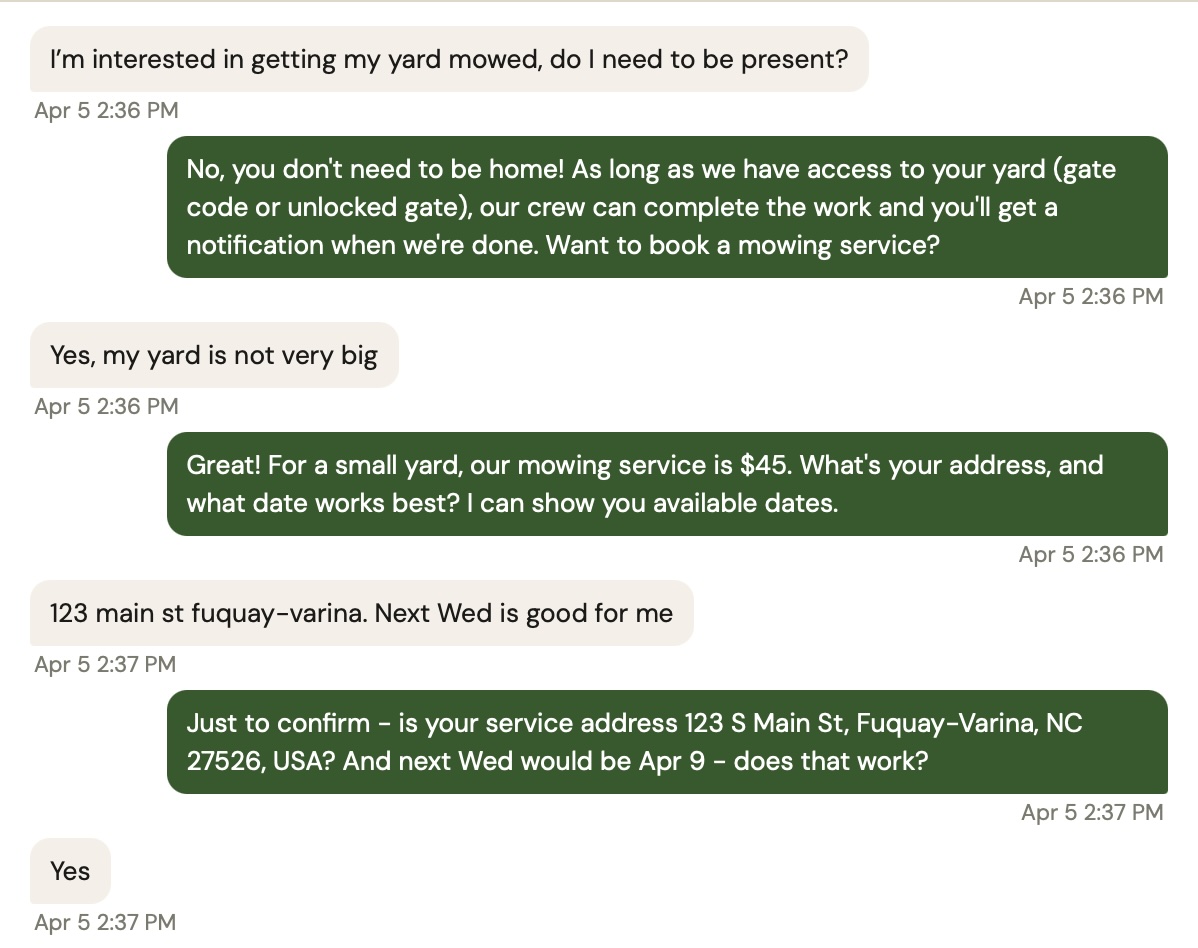
Customer texts to book a job — AI replies instantly

Your customers just text. The AI takes it from there.

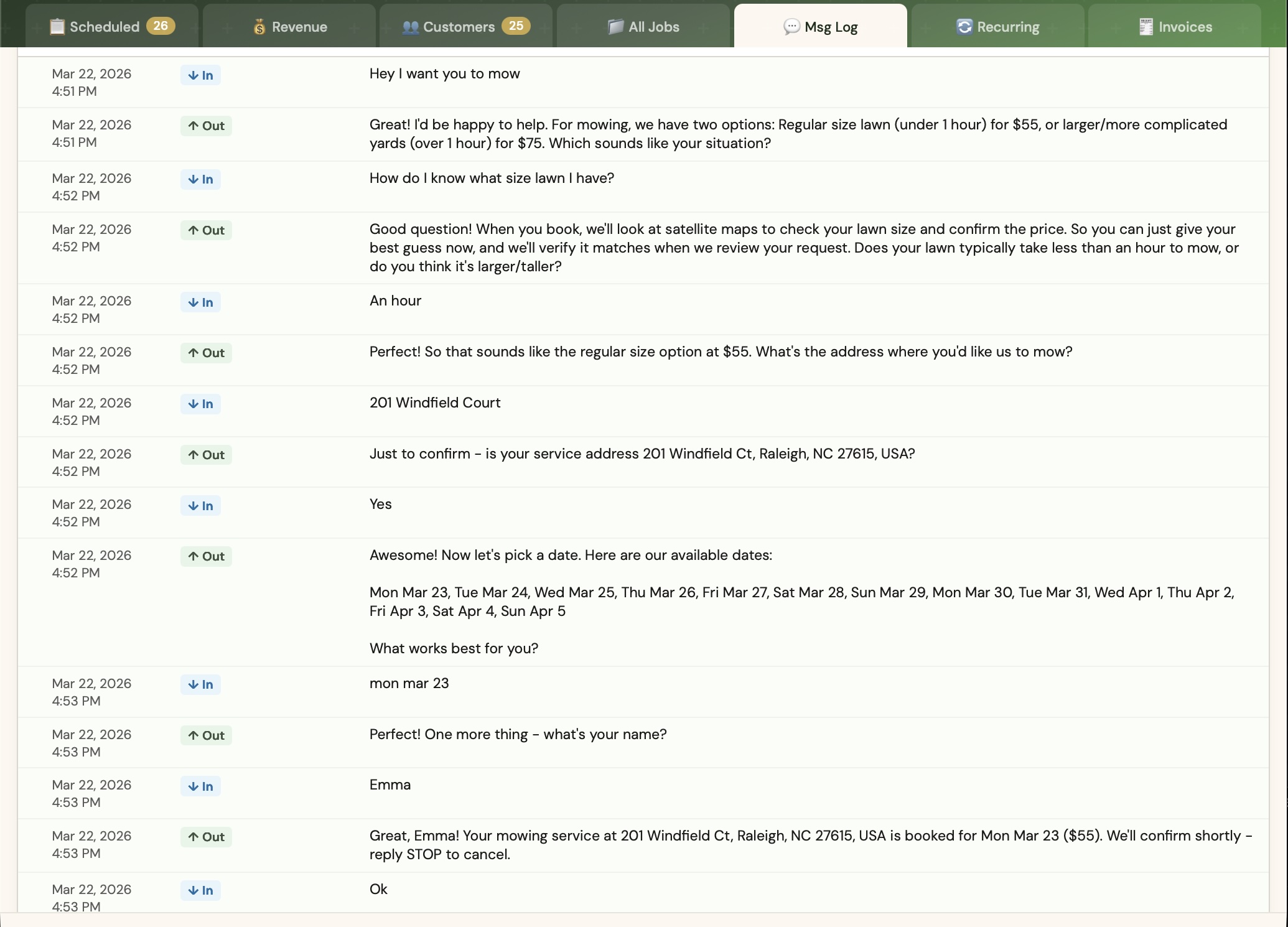
A customer texts your business number — "Can I get a cleanup this Friday?" — and the AI responds, confirms their address, and books the job. No app, no form, no back-and-forth.

  • Handles reschedules and cancellations automatically
  • Detects service area — declines jobs outside your radius politely
  • Learns from your own quick-reply templates to stay on-brand
  • AI confidence scoring lets you review uncertain responses before they send
  • Every exchange logged — full conversation history always available
Customer booking form on mobile — service selection with photos and pricing AI SMS conversation — customer texts to book a lawn mowing job, AI handles the entire exchange

Workers get context before the first ring even ends.

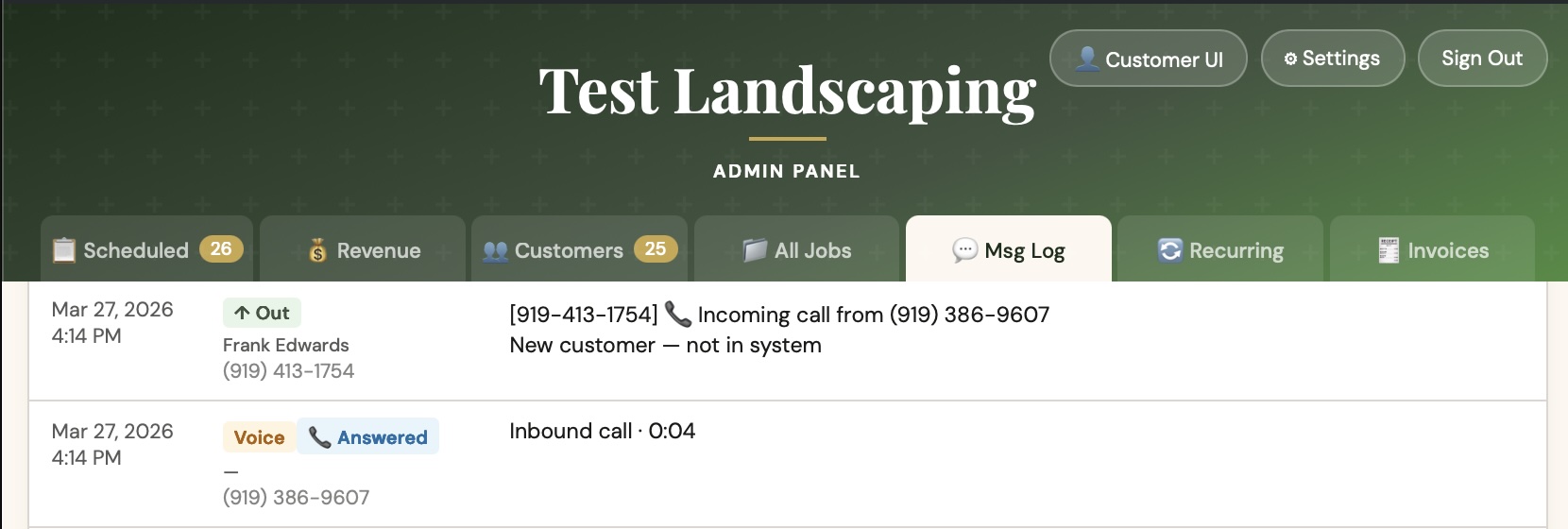
When a customer calls, BookMePls fires a context SMS to every crew member — name, job history, next scheduled visit — before anyone picks up. Whoever answers is already prepared.

  • All worker phones ring simultaneously
  • Context SMS sent the instant the call comes in
  • Full call log: answered / missed, duration, which worker picked up
  • One toggle to pause incoming calls when you're at capacity
Call log showing inbound voice call — context SMS fired to worker, call answered and logged

A calendar that stays out of your way.

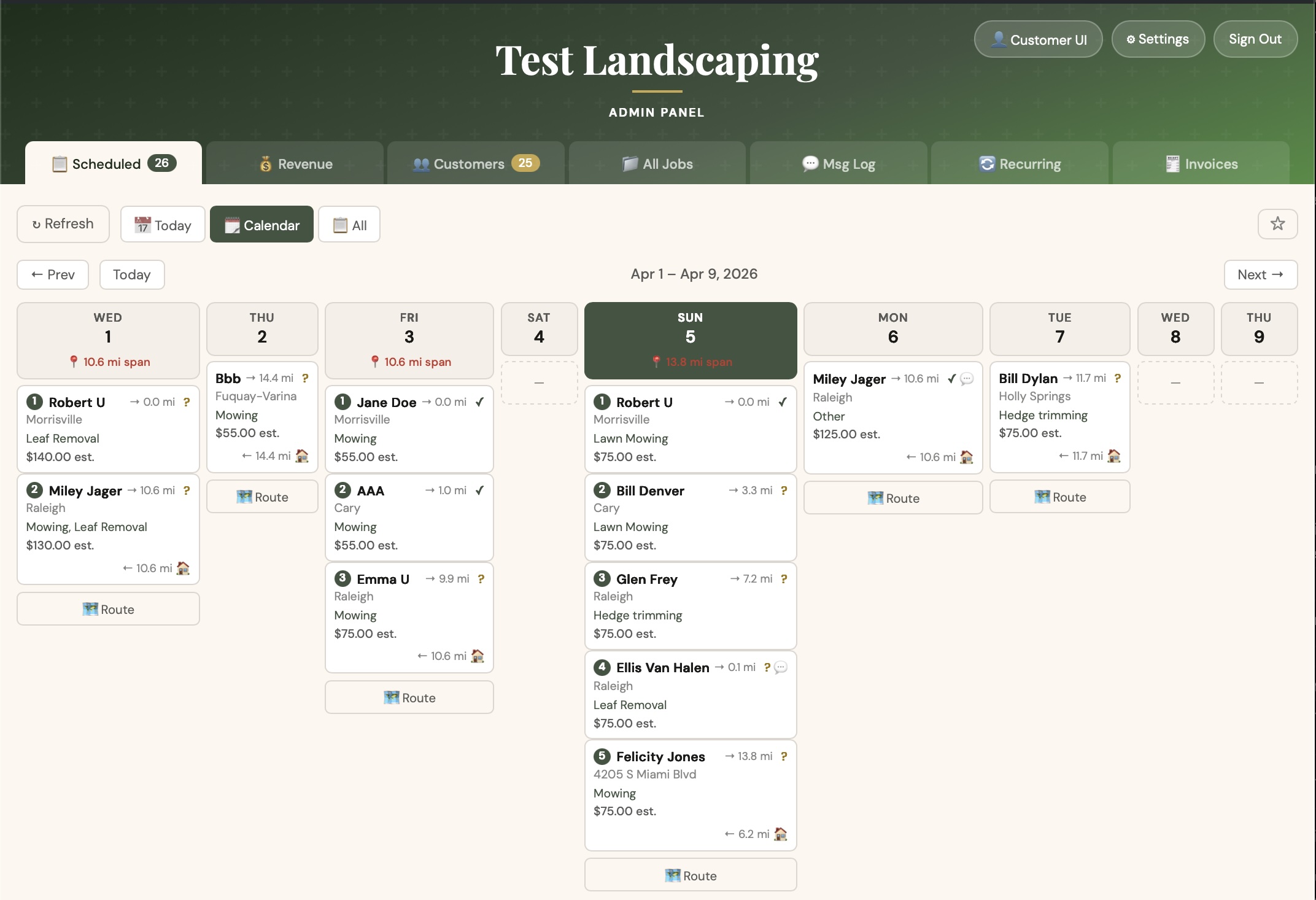
A clean calendar shows every scheduled job at a glance. Today view zeroes in on what's happening now. Confirm, reschedule, or cancel in one click — the customer gets notified automatically.

  • Calendar, Today, and All Jobs views
  • Job confirmation with price setting
  • Reschedule from the calendar — customer notified automatically
  • Real-time updates pushed to all open tabs
  • Color-coded status at a glance
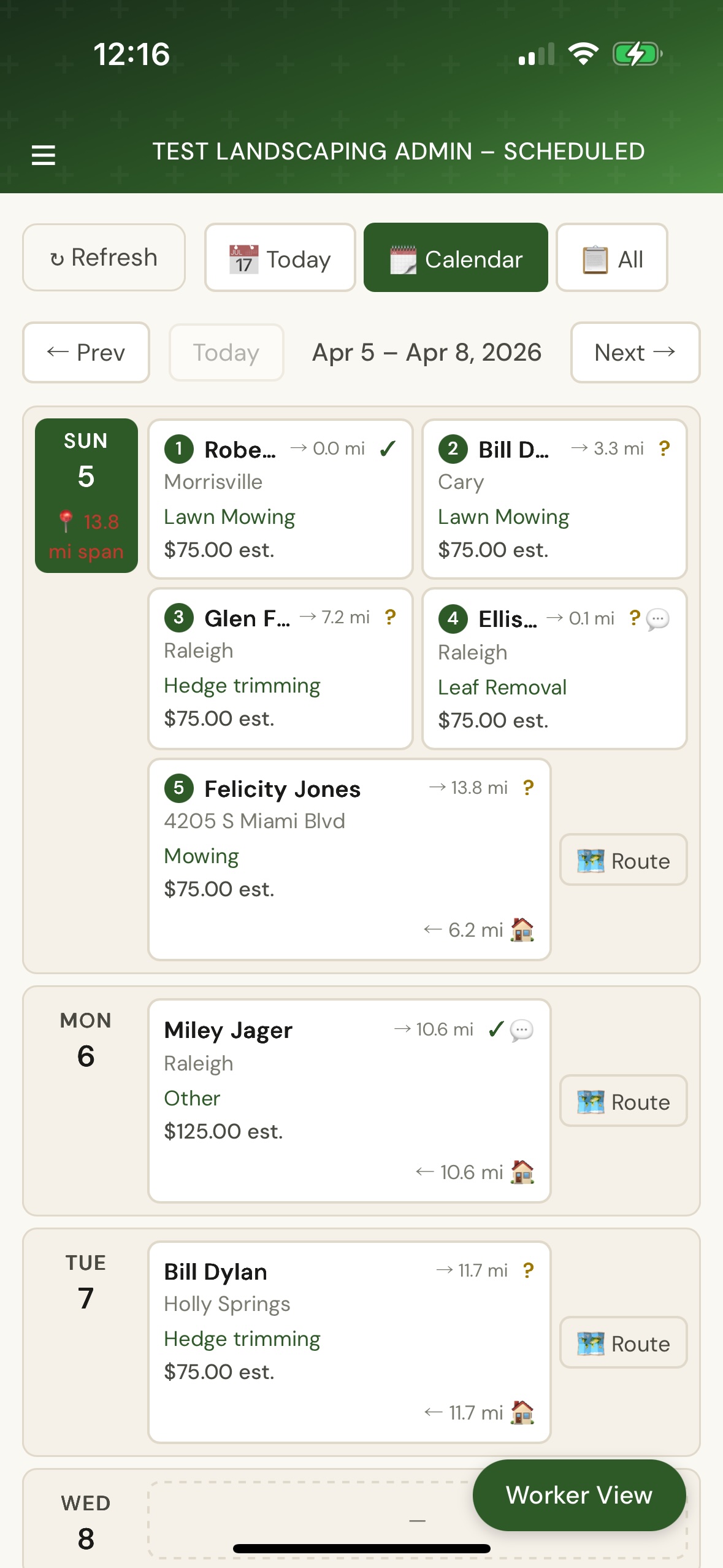
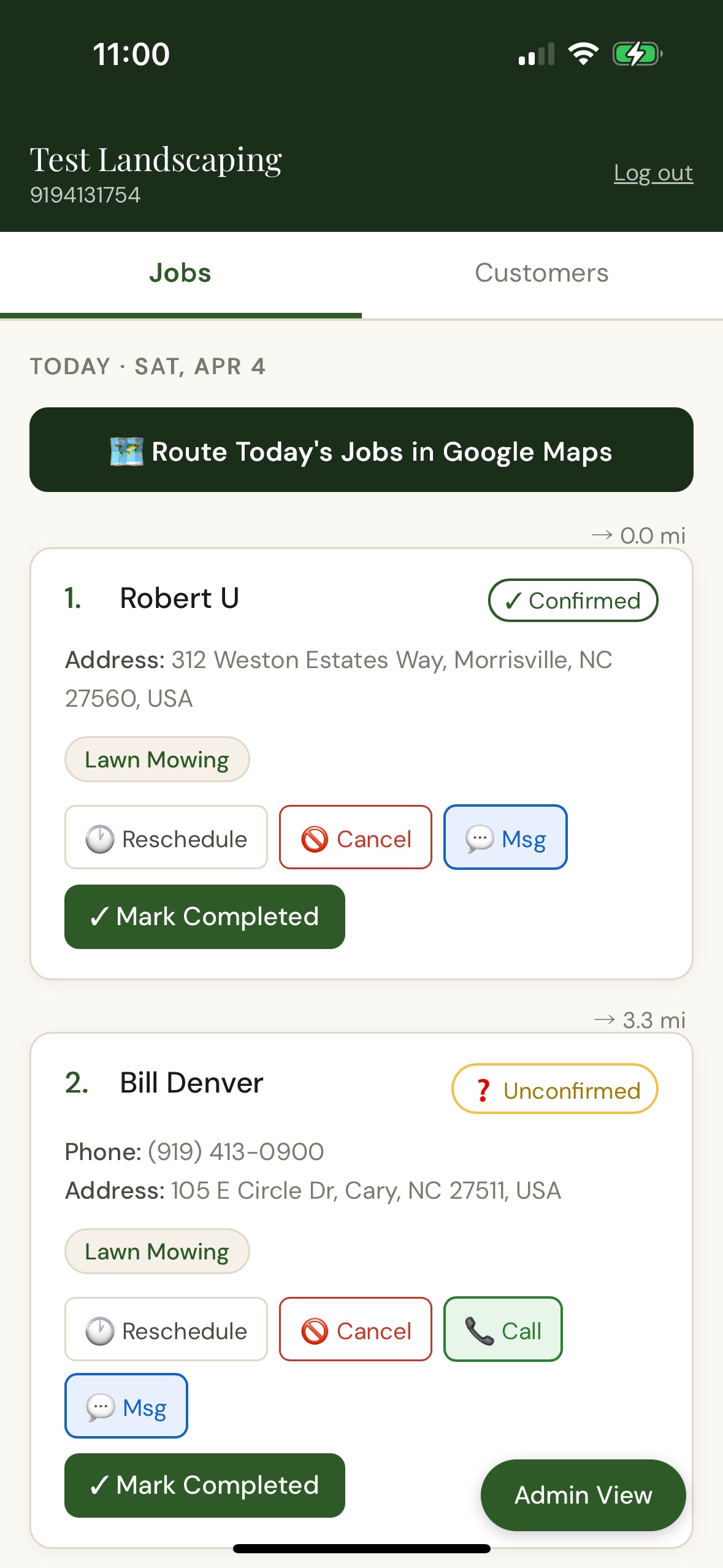
Admin calendar view — week of scheduled jobs with route buttons and mileage spans per day Admin calendar on mobile — today's jobs with numbered route order and one-tap Google Maps routing

Work more, drive less.

BookMePls clusters new bookings geographically — customers are only shown dates that keep your crew's route tight. Then it orders the day's jobs by the most efficient driving sequence, and you launch Google Maps turn-by-turn with one tap.

  • Set your service area: home base address and radius in miles
  • Customers only see dates that fit your geographic constraint
  • Jobs auto-sorted each day by optimal driving order
  • One-tap Google Maps routing through your full day
  • Max daily span setting caps how far apart jobs can be
Worker today view showing route button and distance markers between jobs

Turn one-time customers into steady revenue.

Set a recurring schedule — weekly, bi-weekly, monthly, or custom — and BookMePls queues the next job automatically when the current one wraps. Offer a recurring discount and the system applies it every time.

  • Auto-queues the next job on completion
  • Discount carries forward on every recurrence (flat or percentage)
  • Pause or cancel any schedule from the admin panel
  • Offer recurring plans via signed email links — customer accepts in one click
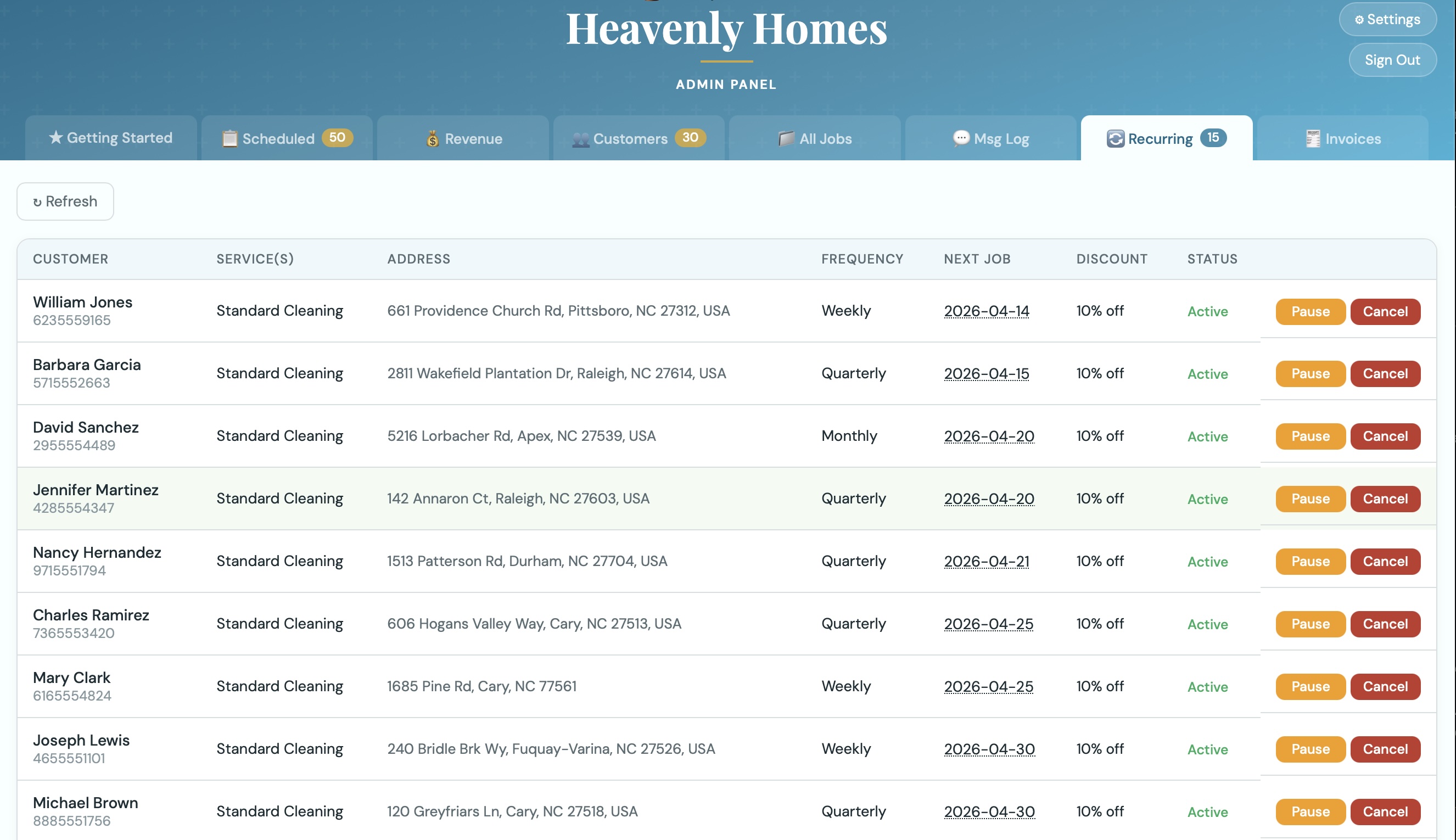
  • Full recurring schedule view with status per customer
🔁
Screenshot: Recurring schedules tab
Capture: Admin → Recurring. Show the list of active recurring schedules with frequency, customer name, and next job date visible.

Invoice in seconds. Customers pay from their phone.

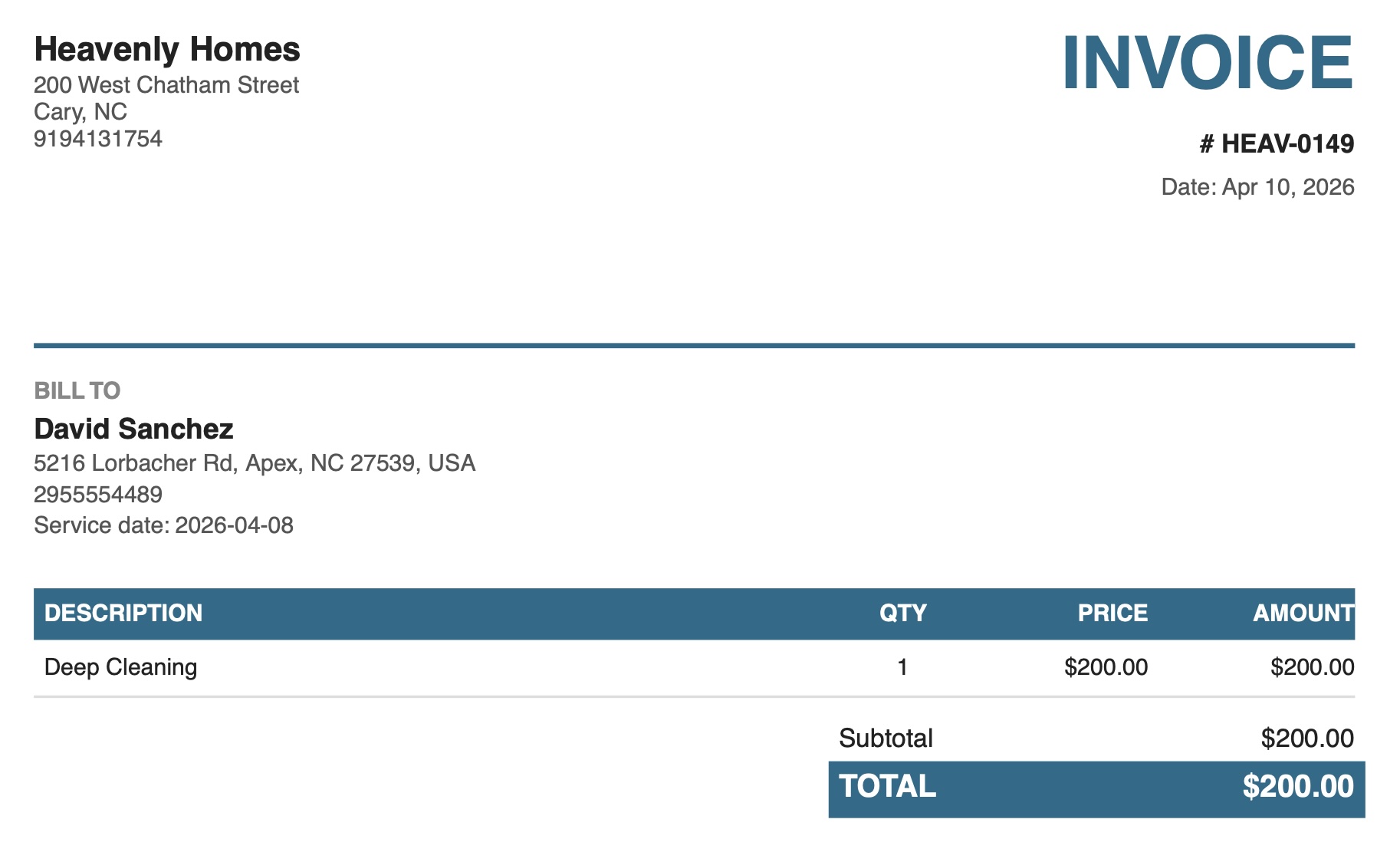
Mark a job complete and an invoice is ready in one click. Customers get a link via SMS or email to a clean, mobile-friendly invoice page. Mark paid when the money arrives.

  • Auto-generated from completed jobs, or create manually
  • Mobile-friendly web invoice viewer with unique secure link
  • PDF download for your records
  • Status tracking: draft → sent → viewed → paid
  • Custom invoice number prefix, payment terms, and footer notes
  • Collected vs. outstanding dashboard at a glance
🧾
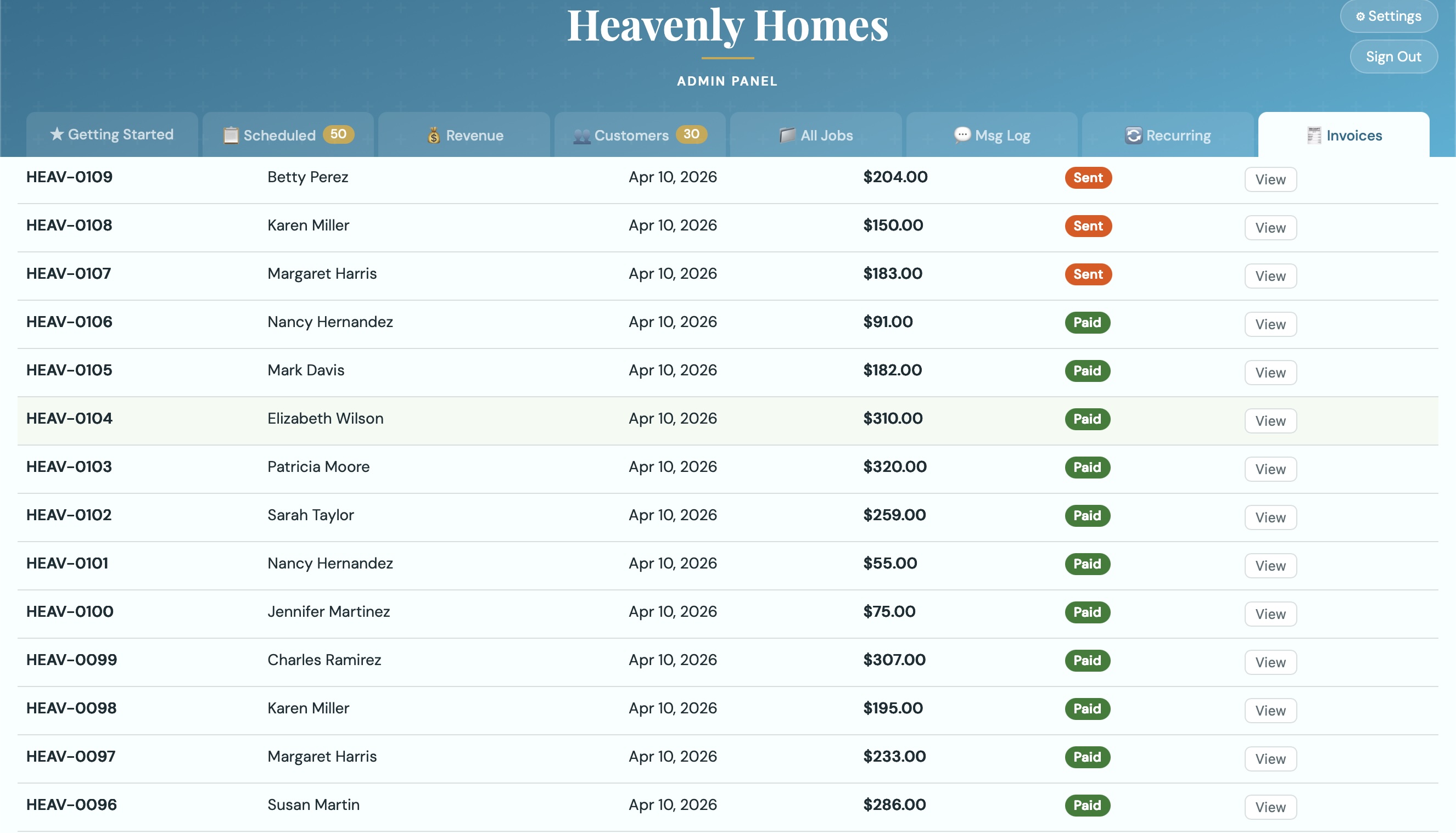
Screenshot: Invoices tab + invoice viewer
Capture two images: (1) Admin → Invoices tab showing the list with status badges and the Collected/Outstanding cards at top. (2) The customer-facing invoice viewer page — open a sent invoice URL.

Every customer. Full history. Zero spreadsheets.

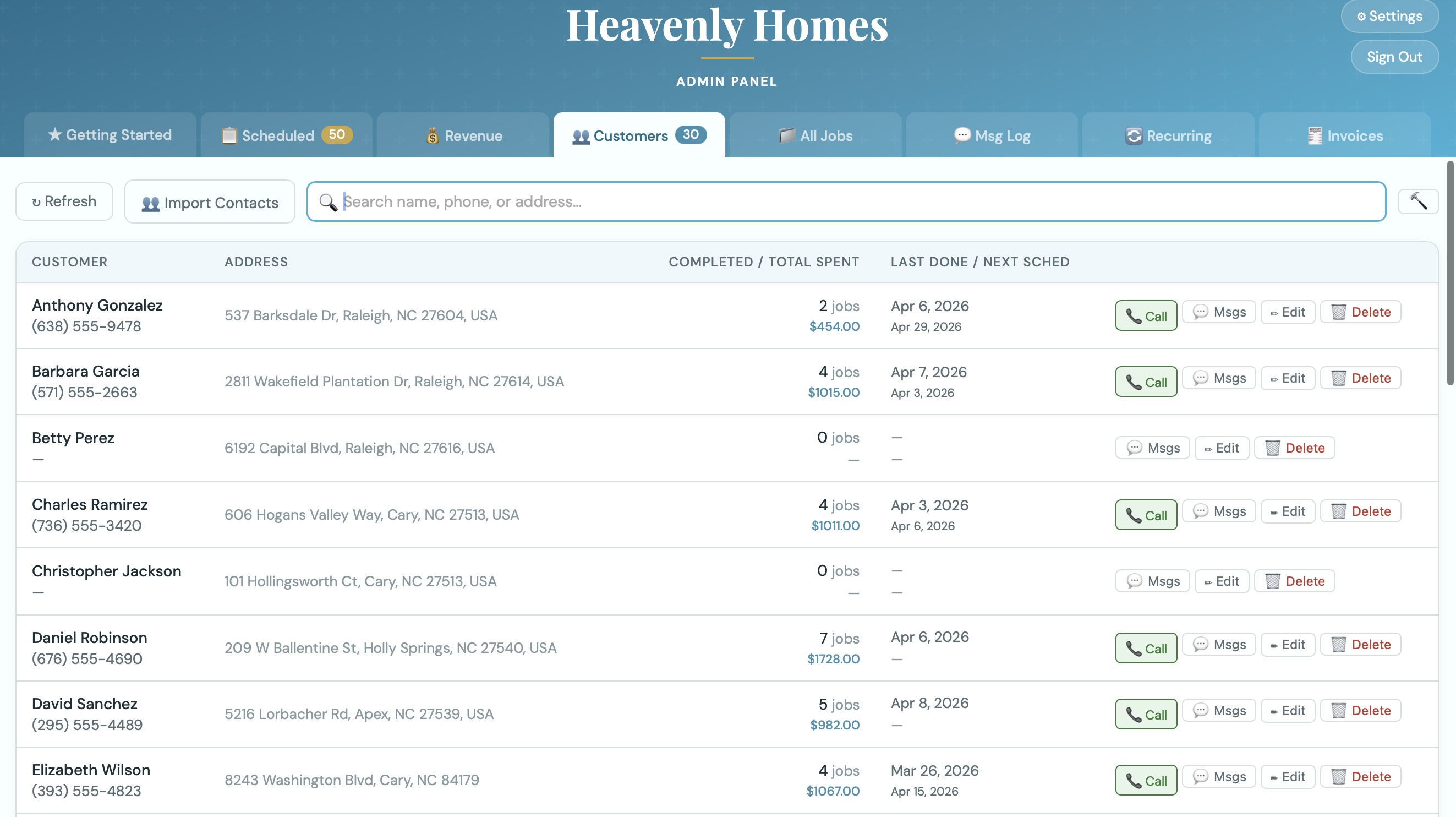
Your entire customer list in one place — searchable, sortable, and always up to date. See lifetime value, last service date, and full message history for anyone in seconds.

  • Import contacts from your phone via vCard
  • Bulk invite campaigns with custom message templates
  • Track invited → replied → booked conversion
  • Edit name, phone, email, and service addresses
  • Full job and message history per customer
👥
Screenshot: Customers tab
Capture: Admin → Customers. Show the table with several customers — include ones with completed jobs and total spent visible. Expand the job history panel for one customer if possible.

Fully operational in minutes, for any trade.

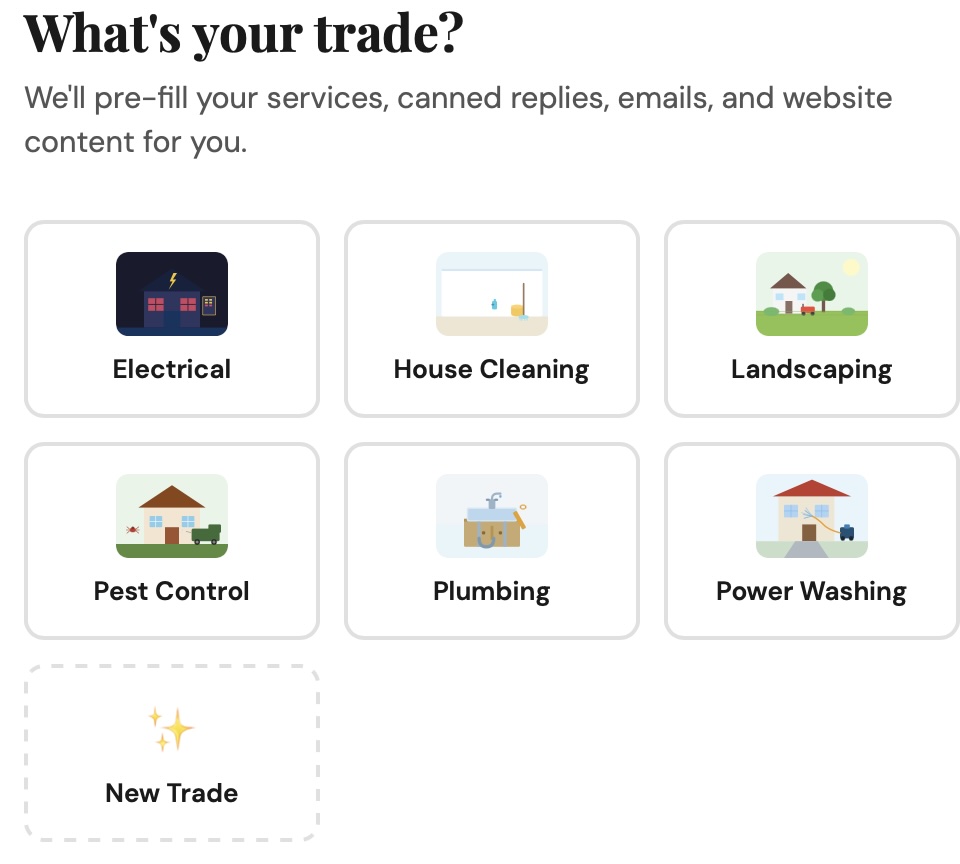
Tell BookMePls what kind of business you run and a fully configured account is ready — services, pricing, quick replies, email templates, photos, and brand colors, all pre-filled for your trade. Most businesses take their first booking within 5 minutes of signing up.

  • Landscaping, house cleaning, pest control, plumbing, power washing, and more
  • Pre-filled service list, FAQ, and message templates
  • Free professional photos from Unsplash built in
  • Custom colors, tagline, and business description
  • Your own subdomain on bookmepls.com — or bring your own domain
Screenshot: SchedAdmin — industry template selection
Capture: SchedAdmin page → Industries tab or new company setup flow showing the template/industry picker.

Built for how small operators actually work

📊

Revenue Tracking

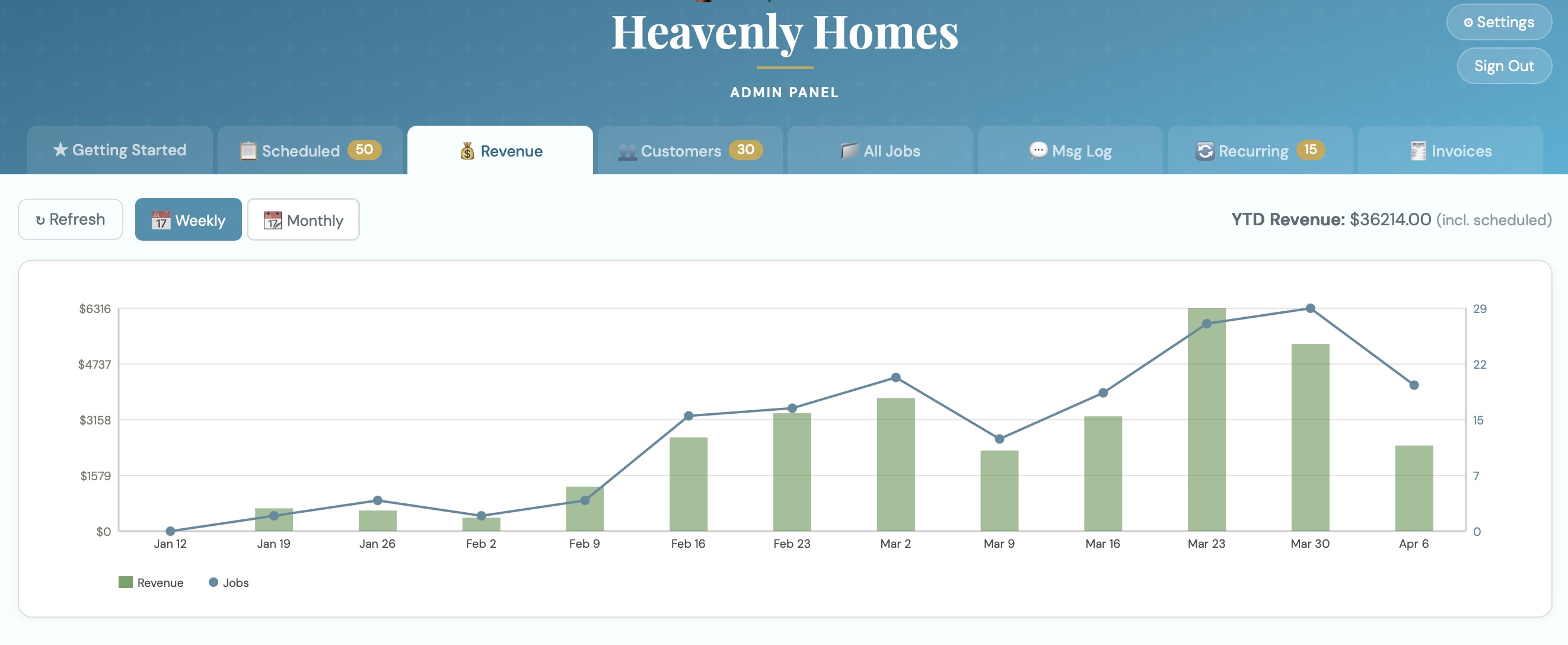
Weekly and monthly revenue charts, year-to-date totals, and customer lifetime value — no spreadsheet required.

🎨

Your Brand, Your Look

Custom colors, service photos, tagline, and description. Everything customers see reflects your business, not ours.

📧

Email & SMS Notifications

Customizable confirmation, reminder, and completion messages. Templates with variables like [name], [date], and [cost].

🔒

Secure Access

PIN-protected admin panel, OTP login for customers and workers, and long-lived session tokens so you stay logged in.

👷

Worker Portal

Separate login for crew members. See today's jobs, mark complete, message customers — right from their phone.

📱

Install as an App

Add the admin panel to your home screen as a PWA. Feels like a native app — no App Store required.

Simple pricing. No surprises.

Annual billing available at 2 months free. Cancel anytime.

Starter
$29/mo
Get organized and look professional from day one.

Core booking & scheduling
Customer portal
Email notifications
Invoicing
Revenue tracking
Up to 50 jobs/month
Get Started
Growth
$99/mo
For operators doing serious volume.

Everything in Pro
Multiple service areas
Priority support
Custom reply templates
Get Started

Built for operators who don't need a fleet of trucks.

Jobber is a great product — built for teams of 5–20. If you're a solo operator or a two-person crew, you're paying for GPS dispatch, QuickBooks sync, and crew management you'll never use.

Feature BookMePls Jobber Yardbook HouseCall Pro
AI SMS booking end-to-end Included
Context SMS to workers on inbound call Included
Geographic job clustering (keep routes tight) Included Add-on Add-on
Scheduling & calendar
Invoicing
Recurring services
Starting price $29/mo $49/mo Free / $29 $49/mo
Industry template (up & running in minutes) Included

The roadmap

We're building fast. Here's what's next.

In progress

Online Payment

Stripe integration so customers can pay directly from their invoice link. Card and bank transfer support.

Up next

Mobile Worker App

Today's jobs, tap-to-complete, customer notes — a PWA optimized for workers on the go.

Planned

Auto-Charge on Completion

For weekly regulars with a card on file — charge automatically when a job is marked complete.